
When a contractor tells me their people have started using AI tools and asks what to do, I start by taking something off the table: this is not a new compliance program.
A company that holds CUI already has the processes. Asset inventory, access management, boundary control, classification, procurement, vendor review, logging, incident response, internal audit, change management. All of it exists. The processes were written for people and for systems that sit still, and AI is neither. They need adjusting, not replacing.
That framing matters because the alternative wastes a quarter. Teams set out to build an “AI governance program,” produce a policy set nobody uses, and never touch the processes where the decisions actually get made. The better question is narrower: where does AI change a decision we already make?
I’ve organized this by process rather than by threat. Threats are useful for getting attention. Work gets assigned by function.
Who needs to be in the room
Treating this as an IT decision is the first failure, and it’s common. IT can tell you which tools are running, block a domain, and pull the logs. IT cannot tell you whether the contract permits that data to be processed by a third party, whether the drawing package is CUI, or whether the vendor’s terms are acceptable. Those are not IT calls and IT should not be making them.
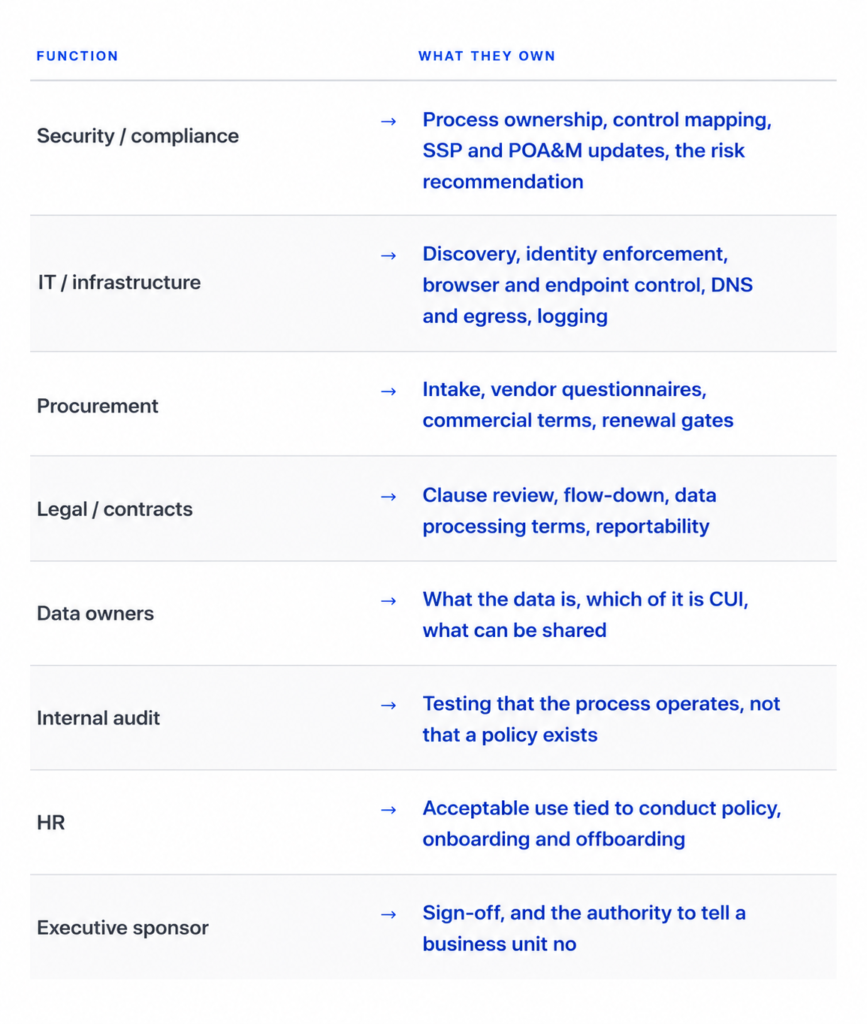
Run it as a standing working group with a named chair. Monthly is enough for governance as long as tool requests have a faster path. Ad hoc coordination fails here — the tools change faster than most compliance committees meet.
The engagement where the
wrong people were in the first meeting. Who was there, who wasn’t, what question you couldn’t answer as a result, and what it cost in time. Include the sector and rough headcount. Anonymized is fine; vague is not.
Asset inventory and software management
Inventory is built around hardware and installed applications. Endpoint agents find binaries. They do not find a browser tab.
Most AI use isn’t installed software. It’s a web session, an extension, a feature switched on inside a SaaS platform you already approved, an API key a developer generated, or a personal account opened on a managed laptop. Your existing discovery misses all of it, and it misses it by design. So discovery widens: browser extension reporting, DNS and proxy records, SSO application registrations, OAuth grants, expense and card data, and interviews with the teams doing the work.
Do not skip the interviews. Logs tell you a domain was reached. The engineer tells you why, what workflow it supports, and that three other people are using two other tools for the same task. Two categories get missed almost every time. An AI feature turned on inside a product you already own, because there’s no purchase and therefore no signal. And a vendor update that adds AI capability you never asked for.
Owner: IT discovers, security and data owners classify what’s found.
Evidence: A dated inventory with the discovery source, owner and use case per entry, plus the reconciliation that shows how the list was assembled.
Software approval and procurement intake
Procurement assumes a purchase. Request, review, negotiate, PO. The purchase is the gate. Most AI tools are free at the point of use, so there is no purchase and no gate. The trigger has to move from spend to use.
That only works if the path is fast. An engineer needs to ask “can I use this forthis kind of work” and get an answer in days. At six weeks, people stop asking. You will not have prevented anything; you will have lost visibility. Add to the questionnaire: where prompts and outputs are processed and stored, retention period, whether inputs train the model, the subprocessor list, authorization status including FedRAMP and at what level, breach notification terms, and what happens to your data at termination.
Owner: Procurement runs intake, security scores risk, legal reviews terms.
Evidence: Completed questionnaires, decision with named approver and date, and the rejected requests. Keep the rejections. They’re what proves the gate can stop something.
Access management
Identity governance covers people. Accounts map to individuals, roles map to functions, joiner-mover-leaver handles the lifecycle, privileged accounts get reviewed.
AI adds identities that aren’t people: service accounts, API keys, OAuth grants, agents, connectors.
Connectors are the sharp edge. A connector inherits the permissions of whoever authorized it. When an administrator authorizes one, the tool acquires administrator-level reach into a document store, and your quarterly access review shows the administrator’s account is appropriate while saying nothing about the connector using it. I find this in environments that pass their access reviews cleanly.
Extend reviews to non-human identities. Inventory OAuth grants and connectors. Apply least privilege to what the tool can retrieve, not to who can open it. Set expiry and rotation on API credentials. Remove AI tool access at offboarding the same way you remove application access.
Owner: IT enforces, security reviews, data owners approve scope. Evidence: Access review records including non-human identities, each connector mapped to its owner, authorization, and reachable data.
Network boundaries, internet access, and public services
The boundary is a diagram. Assets sit inside or outside it and traffic crosses at controlled points. AI breaks that model quietly. The risky session is outbound HTTPS to a reputable domain, initiated by an authenticated employee on a managed device. No malware, no exploit, no suspicious destination. Nothing for a conventional control to catch.
The question stops being where the system sits and becomes what the session is allowed to send.
Practical: DNS and proxy category control for AI services. Allow-list approved endpoints instead of chasing a list of unapproved ones. Browser policy on extensions. Paste restriction into unapproved domains where the tooling supports it. Separation between the environment where CUI work happens and the environment where general browsing happens.
Full outbound content inspection is out of reach for a fifty-person contractor. Say so in the SSP rather than describing a control you don’t operate. Allow- listing, DNS control, browser management and a policy people understand covers most of the risk at a fraction of the cost, and it survives testing because it’s real.
Owner: Infrastructure builds, security sets policy. Evidence: Configuration exports, the approved endpoint list with change history, logs showing the control runs.Data classification
AI finds the weak spot in classification within a week.
Most companies have a classification policy. Most employees can’t apply it under pressure. Someone deciding whether to paste a paragraph into a tool
makes a classification call in about four seconds, alone, with a deadline.
More policy language doesn’t fix that. Fewer categories does. Definitions written in the language of the work rather than the language of the regulation does. Examples drawn from your own document types does. An engineer recognizes “the drawing package for Program X.” They do not recognize “controlled technical information” as anything they’ve ever held.
Owner: Data owners define, security codifies, legal confirms CUI determinations. Evidence: The standard, the mapping from document types to
categories, and training records for the people making the call.
Data labeling and handling
Marking requirements already exist. What changes is who reads the mark. When enforcement moves to a DLP rule or a proxy policy, labels have to be machine-readable and consistently applied, and they have to survive being copied.
Derived output is the gap nobody documents. A summary generated from a controlled document carries the same substance and arrives with no marking, in a chat window, one keystroke from an email. Your handling procedure needs to say what happens to AI-generated summaries, extracts and transformations. Most don’t mention them at all.
Owner: Data owners apply, IT enforces, security samples. Evidence: Label taxonomy, enforcement rules, sampling results.
Configuration and change management
You don’t control every change to a SaaS product you depend on. A vendor activates an AI feature in a routine update and the capability appears on a Tuesday with no change request on your side.
For anything inside the CUI boundary, add recurring review of vendor release notes, treat a new AI feature as a change requiring assessment, and negotiate advance notice into the contract where you have the leverage.
Owner: IT identifies, change board reviews, security assesses in-scope impact. Evidence: Change records covering vendor-initiated feature changes.
Logging and monitoring
After an event you need to answer four questions: which service, by whom,
when, and what category of data.
Capturing full prompt content is a mistake for most contractors. It’s expensive, it creates a new repository of exactly the sensitive material you’re trying to control, and it rarely changes the outcome of the investigation. Session records, proxy logs, SSO events and connector activity are enough to scope a spill.
Set retention deliberately. If the records age out in seven days, a report that arrives in week three is not investigable, and you will be making a repeatability decision with nothing underneath it.
Owner: Security defines, IT implements. Evidence: Log sources named in the
SSP with retention periods, configured and demonstrable.
Vendor and third-party risk, including flow-down
Your vendors are adopting AI in their own delivery, including the ones withaccess to your environment. Your subcontractors are doing what your staff are doing. Flow-down language written before 2024 covers CUI handling and says nothing about model providers.
Add an AI question set to reassessment. Ask which AI services touch your data, whether vendor personnel can submit your information to external models, what governs that, and whether their subprocessors do the same. Review the flow-down language with counsel.
Owner: Procurement and legal jointly, security sets the criteria. Evidence: Reassessment records, updated clause language, subcontractor responses
Incident response and spill handling
This scenario doesn’t behave like the others in your playbook. There’s no attacker to eject and no endpoint to isolate. The recipient is a commercial vendor. And the person who caused it is usually the person reporting it, which is the one advantage you have.
Decide in advance: who determines reportability, what gets preserved, what deletion you can realistically demand from the vendor, and how the 72-hour clock under DFARS 252.204-7012 is triggered and tracked.
Then protect the reporter. Discipline the first person who self-reports and you have taught everyone else to stay quiet. You will not hear about the second one.
Owner: Security leads, legal determines reportability, executive sponsorncommunicates. Evidence: Updated playbook, tabletop record, decision criteria written down before you need them.
Internal audit and assessment procedures
Test the process, not the paperwork.
Reconcile the AI inventory against DNS and proxy records. Sample approved tools and confirm the questionnaire, review and approval exist. Compare non-human identities against the access review. Sample documents for labeling. Confirm vendor feature changes reached change management.
Write these as procedures, not a checklist. A procedure names the population, the sampling method, the test, the expected result, and what counts as a finding. That’s what makes the output usable as evidence and what makes findings trackable to closure.
Owner: Internal audit, independent of the people running the controls.
Where the threats land
With the processes named, the mapping is short.
Phishing built from your public material lands in access management and verification procedure. Reconnaissance at scale raises the probability that a weakness gets found; the answer is still vulnerability management and boundary configuration. Executive impersonation using cloned audio is a procedure problem, not a technology problem — verification that doesn’t depend on recognizing a voice.
Controlled data entering an unapproved tool is the one that has no single owner. Inventory tells you the tool exists. Procurement creates the gate. Classification lets the user decide correctly. Labeling makes enforcement possible. Boundary control limits transmission. Incident response handles it when the rest fail.
That’s why it gets missed. Nothing on its own catches it, so nobody’s control matrix shows a gap.
Sequence
The order matters more than the pace, because each step feeds the next. Inventory first. Until you know what’s in use, everything else is theoretical. Then classification, so the people making four-second decisions have definitions they can apply.
Then the intake and approval path — before you restrict anything. Restriction without an approved alternative moves the work to personal devices, and you have traded a manageable problem for an invisible one.
Then boundary and access: approved endpoints, DNS policy, browser management, OAuth and connector review, non-human identity governance.
Then documentation. Policy, SSP content, POA&M entries for what isn’t closed yet. Then audit procedures that prove it operates.
Steps one through three are where the working group earns its existence. Four through six are ordinary compliance work.
Common failure modes
Banning first. A ban with no approved alternative is not a control. It’s a visibility reduction. The activity continues on personal devices where you have no logs and no recourse, and you find out about it during an assessment.
Policy without a path. A policy requiring approval, with no working approval process, produces documented non-compliance. You have written down that you’re failing.
Leaving procurement out. Security can assess risk. Procurement owns a process employees and vendors already follow. If the intake gate never connects to purchasing, contracting and renewal, you have lost your strongest enforcement points.
Treating it as a project. These are permanent process changes. A program that closes in Q4 is stale by spring.
Where I start
If you hold CUI and can’t produce a defensible inventory of the AI tools and AI- enabled features touching your environment, that’s the starting point. Not a twenty-page policy. Not a ban.
Build the inventory, trace the data flows, decide which uses are legitimate, and put the processes you already have around them.
From there it’s manageable. You can see which tools need review, which data needs labeling, which connectors have too much reach, which vendors neednew questions, and which gaps belong in the POA&M. Leadership gets the real environment instead of an assumption.
We run that as a fixed-scope engagement — AI in CUI Environments, two weeks, $4,500: inventory, data flow analysis, acceptable use policy for in- scope systems, and a guidance memo for leadership sign-off.
Book a scope call if you’d rather talk it through first. Thirty minutes, no charge.
Advisory content, not legal advice.